
In a recent post on the Digital Ministry Facebook page, it was announced that the MyGOV app allows Malaysians to apply for a replacement MyKad without having to visit a National Registration Department (JPN) counter.
The online service will be a one-to-one MyKad replacement, without involving any changes to the personal particulars on it. This includes address, photograph, or any other personal particulars. The MyKad being replaced will also need to have been issued in the last 10 years.
Those looking to replace their MyKad can start by installing the MyGOV app. Make sure to have MyDigital ID set up, as it is required to log in to MyGOV.
For an explainer on how to do that, readers may refer to the StarLifestyle guide from when MyJPJ added MyDigital ID logins.
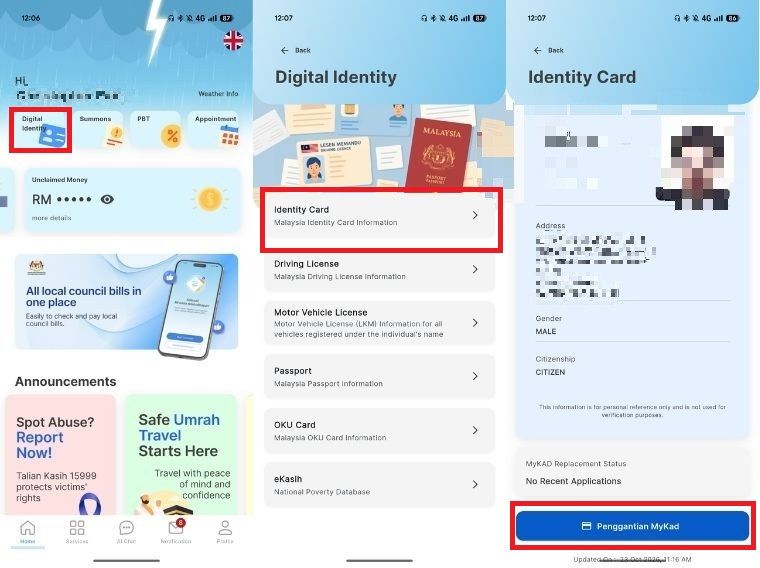
Once installed and logged in, users will find themselves on the home screen. From here, tap on the button labelled "Digital Identity" and then select the "Identity Card" option.
This will bring up a screen displaying personal particulars on the existing MyKad, such as full name, address, gender, photo, and citizenship status. The status of recent MyKad replacement requests will also be shown on this screen. Simply scroll to the bottom and tap on the "Penggantian MyKad" button.
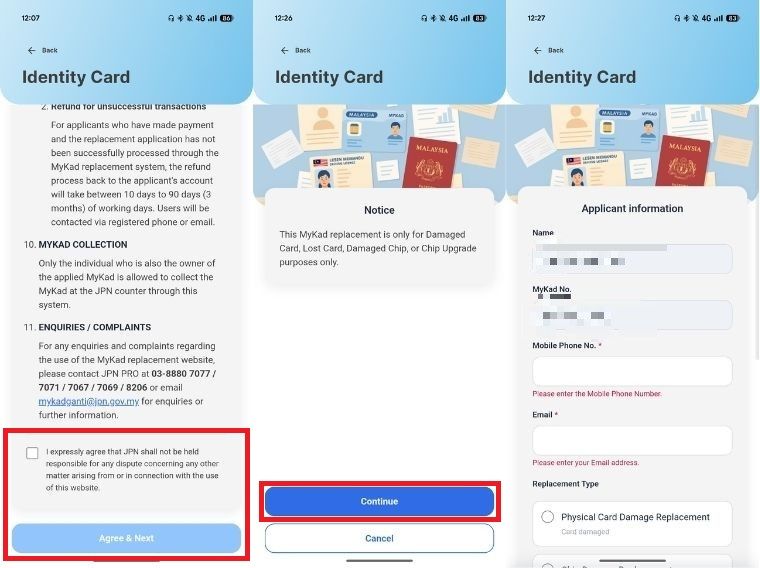
Users will then be shown a disclaimer containing the terms and conditions for the service. After reading, tap on the disclaimer box at the bottom and hit the "Agree & Next" button.
The next screen will display a notice stating that the service is intended for damaged or lost cards and for chip upgrading purposes. Tap "Continue" to proceed and fill out the applicant information form before proceeding to the next page. This is also where the MyKad collection centre is selected.
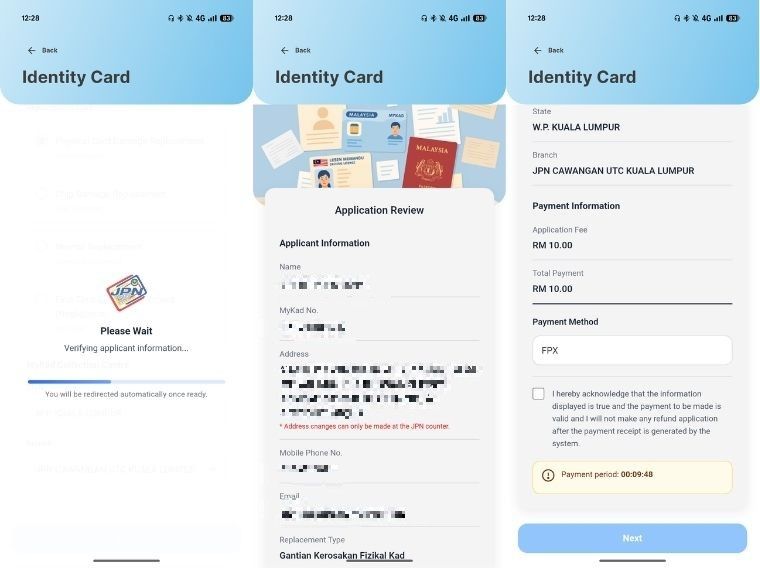
After that, applicants will be prompted to check the information provided to JPN before making payment for the MyKad replacement.
The fee involved will differ depending on the reason for the card's replacement, and can range from RM10 up to over RM1,000 for those who repeatedly lose their MyKad.
Something to note is that the JPN online MyKad replacement system is only operational between Monday and Friday, from 8am to 4:30pm. It is closed on both weekends and public holidays.
Following a successful application, Malaysians can collect their MyKad at the JPN Federal Territory Putrajaya Headquarters, State Headquarters, and JPN branches with distributed printing machines within 30 minutes of the successful transaction.
Meanwhile, collections at other JPN branches in Peninsular Malaysia can be done after five working days, while collections at branches in Sabah and Sarawak take seven working days.
The MyGOV app advises applicants to check the status of their application on the JPN website (www.jpn.gov.my) before going for collection.