

Google has updated its keyboard, Gboard to allow users to make it “float” so they can place it wherever convenient on the screen.
According to 9to5Google, the feature is build into the Gboard menus, and when used creates a direction-pad below the keyboard to move it or even increase or decrease its size.
The feature works similarly to the One-Handed function, which shrinks the keyboard to make it more accessible on larger smartphones.
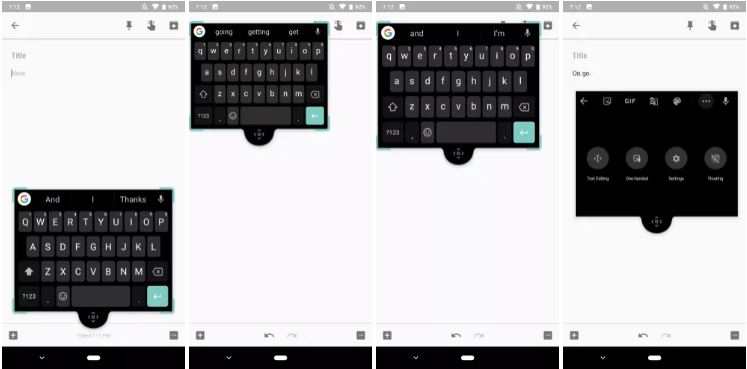
An example of how users will be able to move their keyboards around with Gboard's new features. — 9to5Google
“When not in use, the window becomes transparent to allow users to read what’s on the rest of the screen without interruption,” says 9to5Google, in a post based on data it mined from the latest Gboard app update.
They add that the feature is live for Gboard 7.6 Beta users for now.
Another feature introduced for version 7.6 Beta is the battery saving dark theme, which turns on when the system battery saver is enabled.
“In practice, the switch is not instantaneous. If users already have a keyboard open when the battery saver is enabled, it will not automatically update. It has to first be closed and then reopened,” it says.
The dark theme is essentially just a new theme that users can select, and can be toggled on/off in the Preferences menu under the Layout section
Two more features discovered by 9to5Google – Smart Reply for notifications and new emoticons – are embedded into the code, but appear to still be under development.
