

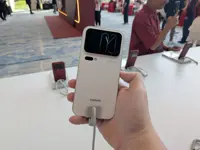
I’ve only been using an iPhone Duo for a week or so, but I think I’m prepared to say that Apple figured out a lot of what it takes to make a good foldable iPhone. The form factor is a little odd at first, but you do get used to it. And, unfolded, it’s one of the most fun products Apple has ever made.
There were, however, a few problems. None of them, by themselves, were fatal. But they definitely made using the device slightly less enjoyable than it could be.
Now, just a few weeks after launching the Duo, Apple released iOS 27.3 beta 2, which addresses two of the most annoying problems. The company also announced a pretty significant milestone for the number of apps optimised for the foldable iPhone.
All three of them are pretty big deals, though they are currently only available if you’re running the developer beta. That means Apple could make changes or remove the features altogether. Assuming that’s not the case, here’s what’s coming:
1. Face Unlock
Easily the most annoying thing about the iPhone Duo is that it doesn’t have Face ID. I mean, I can understand why they weren’t able to make that work. The Duo is very thin, and you’d need two Face ID setups, one for the front display, and one for when it was unfolded. I imagine that gets pretty expensive. And so, Apple opted for Touch ID instead.
That’s fine, except there are two problems. The first is that Face ID just works. It’s faster most of the time, and it doesn’t depend on lining the right finger up in just the right place. Which leads to the second problem, which is that the iPhone Duo is kind of weird in the sense that it’s easy to get it all rotated and disoriented, which makes it kind of hard to figure out where to put your finger when you need to use Touch ID.
Also, and this isn’t a small thing, if you’ve spent almost a decade using Face ID to unlock your iPhone, it does make you feel strange to stare at it, waiting for it to unlock while it just sits there pretending like you don’t exist.
With iOS 27.3, Apple is fixing that. Well, sort of. Technically, it’s adding the ability to unlock the Duo using the front-facing camera, but only when the phone is closed. Presumably that’s because the under-the-screen selfie camera on the Duo just isn’t good enough to work for this reliably.
There are also a few limitations. It’s not actually Face ID. There is no dot projector or flood illuminator or infrared sensor. The Duo uses a less secure version of facial recognition. To make up for that, Apple requires you to have used your passcode or Touch ID within the last 45 minutes for it to work. It also won’t work for Apple Pay, or to unlock your Passwords app. Honestly, that’s fine. The only thing I really want is to quickly unlock the iPhone to read messages or open an app quickly.
2. More than 200,000 optimised apps
Last week, Apple said there were 100,000 apps that had been optimised for the Duo. That’s a meaningful number, and it’s a significant milestone. Well, this week, Apple says that number is now 200,000.
I think it’s incredibly encouraging that the number keeps going up, though it’s a pretty small percentage of the total apps in the App Store. I imagine there are a lot of apps that will take a very long time – if ever – to be updated. Our credit union, for example, may never get around to it.
At the same time, there are apps that should have been updated by now—like pretty much every streaming service except YouTube and Netflix. The rest of you, what are you even doing? This device is perfect for consuming your content, and you should be embarrassed to not have done anything but the basic update that comes with iOS 27. Still, Apple being able to announce that the number doubled in just a week is impressive.
3. Closing the Duo can now lock it
Okay, I was wrong before. The most annoying thing about using the Duo is actually the fact that when you’re done using it and you close the display, it doesn’t lock automatically. It just transfers whatever you were doing to the front display.
I sort of understand why Apple did that – it doesn’t want to assume you’re done just because you decided to switch screens. But I can’t tell you how many times I accidentally tapped on something I didn’t mean to after closing the display because my brain assumed it was locked when it, in fact, was not.
Now, Apple is giving you a choice. So, if you think my brain is just broken, that’s fine; you can leave it alone and pray you never accidentally tap on the camera app before you put it in your pocket, because, friend, your US$2,000 (RM8,226) iPhone battery is going to be dead when you get home.
Look, none of these changes make the iPhone Duo perfect. But I think it’s great that Apple is addressing three of the most obvious annoyances in the version they already shipped. For a quirky, first-generation product, that’s a pretty good sign. – Inc./Tribune News Service