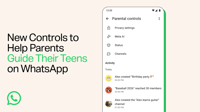
LOS ANGELES: WhatsApp has announced new tools for parents to supervise their teenage children's use of the messaging app. The controls can be linked to existing accounts held by young people aged 13 and over, according to WhatsApp's parent company Meta.
The link is designed to be set up jointly by parents and teenagers. Parents can then use their own WhatsApp account to monitor certain settings and activities on their child's account.
However, parents cannot read messages or listen to calls. Personal messages and calls made by teenagers remain private even when parental supervision is active, as do group messages, Meta emphasises.
From privacy to AI: what parents can control
Parents will have the following options:
- Managing privacy settings – for example, deciding who can see their child's profile picture or add them to groups.
- Receiving notifications about their child's group activity – for example, when a teenager joins or leaves a group, or when a group grows larger.
- Setting how the artificial intelligence tool Meta AI may be used – either "13+" or the more restrictive "Limited Content" option.
- Deciding how channels may be used and which status updates are visible to the child and to others.
Meta says the parental controls will be expanded and developed further in the future.
Managing the settings generally requires entry of a dedicated PIN, which only the parents should know. Teenagers may at any time apply stricter privacy settings without a PIN.
Relaxing or removing existing settings, however, is not possible without parental approval via PIN.
How to set up the controls
Setting up the parental controls begins in the account settings on the teenager's phone. Go to Settings/Parental Controls/Continue. Then enter the child's date of birth and confirm their age. Tap Continue. A QR code will then appear, which parents must scan with their own smartphone.
Then tap the link shown to open WhatsApp, confirm that you are an adult, create the parental PIN and follow the instructions. Detailed information about the new parental controls can be found on the WhatsApp support pages.
It may be some time before the parental controls appear on all smartphones or tablets. If in doubt, check the app stores to see whether an update for WhatsApp is available. – dpa/Tribune News Service